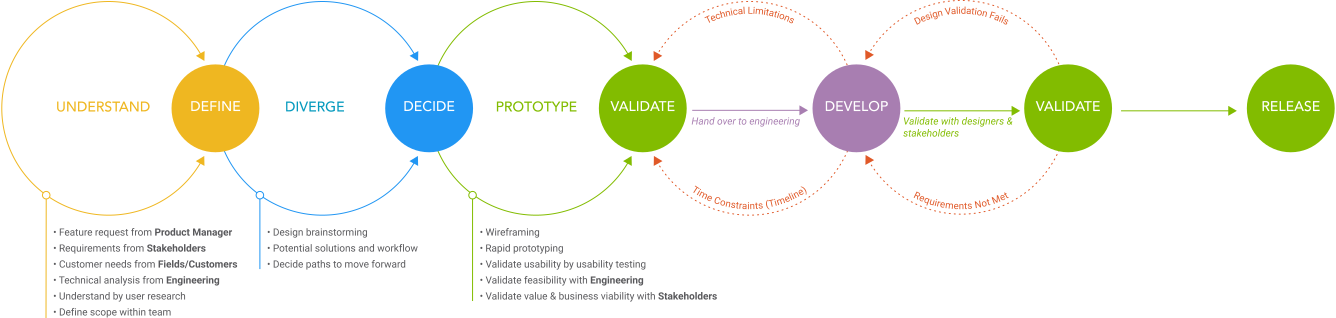
As lead feature designer on Hub, I worked a repeatable process — gathering requirements, running design workshops, wireframing, design critiques, and high-fidelity prototypes — to take features from a problem to a shipped design. Integration Landscape was one of two features I led; the other, making integration configurations portable, is written up separately.
Tasktop · 2022 · Senior UX Designer · Design Lead
Integration Landscape: a value-stream overview for Tasktop Hub
Designing the first at-a-glance view of an enterprise's entire software delivery value stream — by scoping a broad problem down to the view that mattered first.
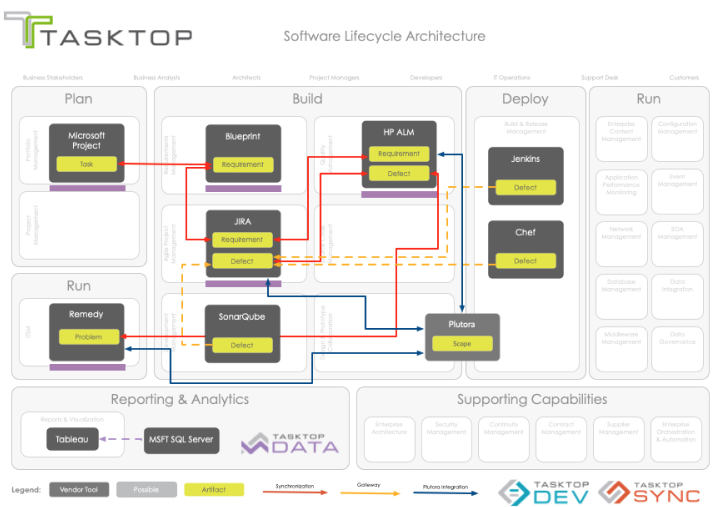
Tasktop Integration Hub is enterprise software that connects the specialized tools across a software delivery chain — flowing work automatically from tool to tool so teams stop sharing every update through emails, status sheets, and endless meetings.
The problem
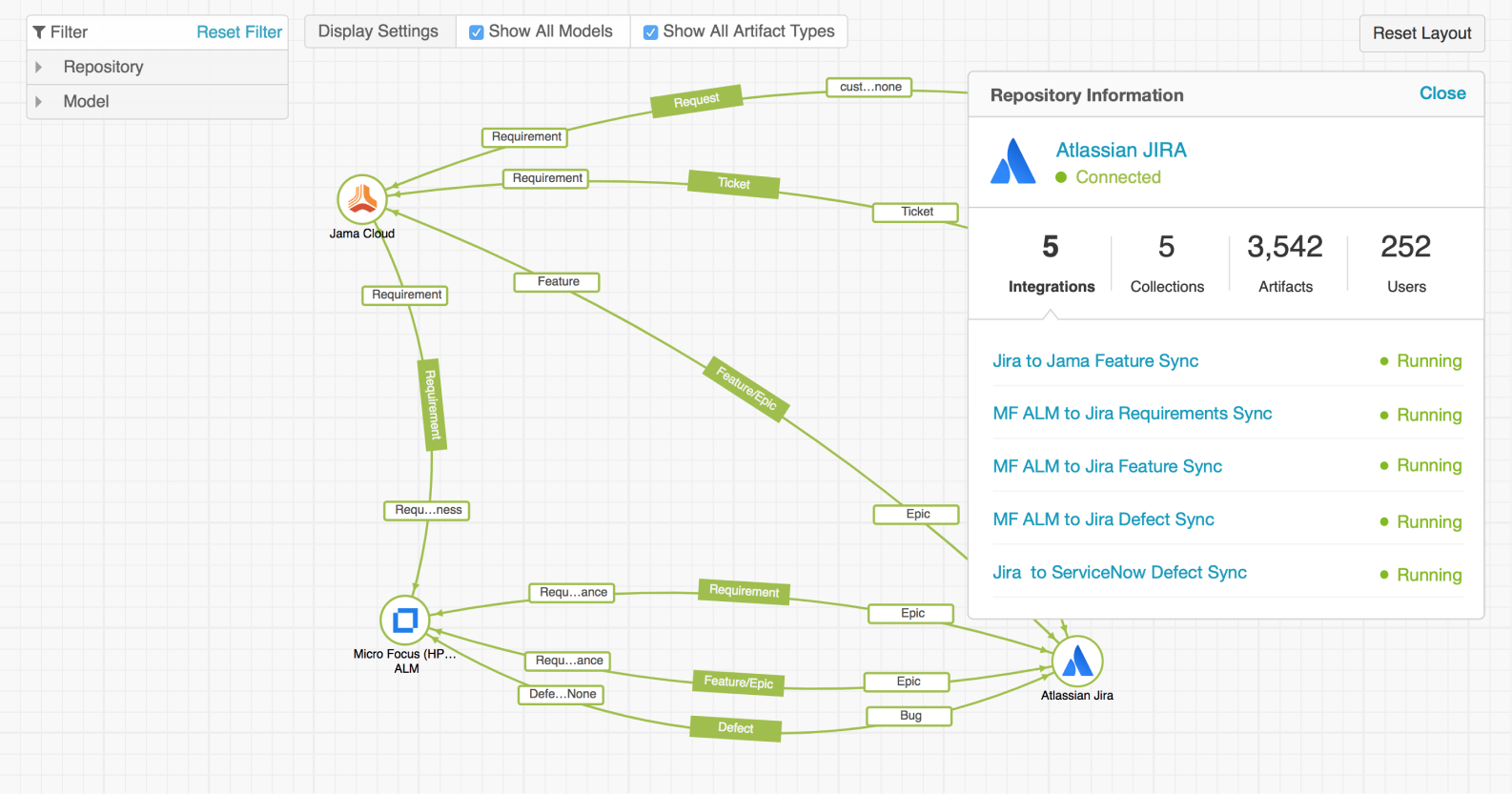
The Integration Landscape is the overall view of all the integrations a customer has set up. It aims to help users better understand their artifact flow in a big picture, and — eventually — provide an intuitive way to build their integrations. Landscape view provides a simple but dramatic visual overview of an enterprise’s entire software delivery value stream. This kind of at-a-glance value-stream overview was the first of its kind: it lets users quickly see which systems are integrated, what models are being used, whether flows are one-way or two-way, and which artifacts are flowing between tools (e.g. Stories, Defects, Requirements).
Background
Tasktop Integration Hub is enterprise software built to power some of the world’s largest Agile and DevOps transformations. From the feedback we got, customers were very happy with the tool’s efficiency and effortlessness. However, when prospects and customers start thinking about their integration, they start at the very highest level rather than the low-level details, and work their way down. Given the stage of the product, we only had the lower levels there — integrations were created by starting with the available elements and working up. This made it difficult for users to get higher-level visibility into their entire landscape in a single place.
Requirements and design workshops
I gathered the fundamental requirements and the nice-to-have user needs, then ran cross-disciplinary design workshops where team members could rapidly generate and discuss a wide set of ideas from different perspectives.
Fundamental requirements
Visualize the workflow
It must be easy for users to visualize the entire workflow.
Locate an integration
Users must be able to quickly locate an integration.
Match users’ mental model
The Landscape must match how users think about the flow of information between different systems or departments.
Construct without full detail
It must let users dynamically construct integration components without having all of the details upfront.
Who joined the workshops
Product Manager
Insights from the perspective of business value and product vision.
Engineering
Opinions from the perspective of technical feasibility.
Customer-facing team members
Customer use cases and scenario details.
UX designer
Sketching ideas and digging deep to refine concepts and tackle design challenges.
Wireframing, critiques, and scoping down
After the workshops, we determined the basic workflow for how users could build the landscape from scratch and run integrations from it. However, after discussing with stakeholders — especially engineering — with the concern of time and effort, we decided to narrow the scope and focus on the display-only view first, then build up from there.

We explored three versions of the concept. Version 1 had clear procedures to build the landscape but was difficult to develop and not very scalable. Version 2 (scoped to display only) was less complicated to develop and scalable, but the flow was harder to read as a whole. Version 3 (also display-only) had a clean structure that was intuitive for viewing the overall flow between repositories, made it easy to filter the artifact flow, and gave a good foundation for integration construction in the future.
Final design

What I took away
Enterprise software platforms are typically complicated, heavyweight, and difficult to use, and user experience is often overlooked. But UX plays a huge role in the success of a software company: good UX improves not only the user’s happiness but their effectiveness in meeting company needs. In this project I learned how to scope down a problem and extract its key values. Hiding the non-essential details and providing a high-level landscape presents a much clearer view of customers’ overall integrations and reduces noise; they can then use toggles and filters to locate and browse details as needed. Instead of solving the whole challenge at once, I got my ideas into shape by breaking it down, then put them together at the end.